---
title: VFD Faults and Alarms
description: How to clear a fault on the VFD and isolate which fan is causing the trip/error
---
[Skip to content](https://customers.gigaenergy.com/vfd-faults-0#main-content)
English
Show submenu for translations

- Support
Show submenu for Support
- Customer Portal/FAQs
- [Submit Support Ticket](https://www.gigaenergy.com/support)
- [Track Open Support Ticket](https://customers.gigaenergy.com/dashboard)
- [Order Spare Parts](https://www.gigaenergy.com/support)
- [Build a Quote](https://www.gigaenergy.com/build-a-quote)
- Order Management
Open main navigation
Close main navigation
- Support
Show submenu for Support
- Customer Portal/FAQs
- [Submit Support Ticket](https://www.gigaenergy.com/support)
- [Track Open Support Ticket](https://customers.gigaenergy.com/dashboard)
- [Order Spare Parts](https://www.gigaenergy.com/support)
- [Build a Quote](https://www.gigaenergy.com/build-a-quote)
- Order Management
- English
Show submenu for translations
- [Contact Us](https://www.gigaenergy.com/support)
[Contact Us](https://www.gigaenergy.com/support)
How can we help you?
- There are no suggestions because the search field is empty.
1. [Customer Support Portal](https://customers.gigaenergy.com/?hsLang=en)
2. [VFD](https://customers.gigaenergy.com/vfd?hsLang=en)
# VFD Faults and Alarms
## The steps and information provided above are intended as general guidelines only. They are not a substitute for professional advice or service. We do not accept any responsibility or liability for any issues, damages, injuries, or losses that may result from following these steps. All electrical work should be performed by a qualified and licensed professional in accordance with local codes and safety regulations.
---
### **Table of Contents:**
### [Clearing a fault/Power cycling the VFD](https://customers.gigaenergy.com/vfd-faults-0#clearfault)
### [Faults](https://customers.gigaenergy.com/vfd-faults-0#faults)
### [Alarms](https://customers.gigaenergy.com/vfd-faults-0#alarms)
### [VFD Manual](https://customers.gigaenergy.com/hubfs/Support/Data%20Centers/VFD%20Manual%20-%20ACS510.pdf?hsLang=en)
---
### **Faults - A fault is an error that is keeping the VFD from outputting signal/power to the fans**
[**(Back to top)**](https://customers.gigaenergy.com/vfd-faults-0#table-of-contents)
### **F0001 = Overcurrent**
### Output current of the VFD is higher than design limit. Need to isolate which fan is causing excessive current draw using the steps [**VFD Troubleshooting (F0001 and F0016)**](https://customers.gigaenergy.com/vfd-faults?hsLang=en)
### **F0003 - Dev Overtemp**
### The VFD is overheating. This is normally caused by the internal VFD fan not operating properly or is obstructed.
### Troubleshooting:
### Possible obstruction or failed internal fan in the VFD - See **[VFD Manual](https://customers.gigaenergy.com/hubfs/Support/Data%20Centers/VFD%20Manual%20-%20ACS510.pdf?hsLang=en)** for additional information
### **F0016 = Earth/Ground Fault**
### VFD is detecting a ground fault. Need to isolate which fan is causing a ground fault using the steps [**VFD Troubleshooting (F0001 and F0016)**](https://customers.gigaenergy.com/vfd-faults?hsLang=en)
---
### **Alarms - An alarm is only advising of certain settings or a warning. It does not keep the VFD from operating**
[**(Back to top)**](https://customers.gigaenergy.com/vfd-faults-0#table-of-contents)
### **A2004 - Output direction is locked**
### This flashes at startup of the VFD signifying that the VFD is only allowing the fans to blow in one direction
### Troubleshooting:
### There is no troubleshooting necessary. This has been set at the factory.
### **A5011 - Drive is controlled from another source**
### This means the VFD is currently in REM/Remote mode and must either be controlled from the HMI, which controls off/on and speed, or set in LOC/Local mode before making any changes to any settings/parameter changes
### Troubleshooting:
### Set the VFD in LOC/Local mode to make any changes. Push the LOC/REM button until you see the LOC in the top left corner. This means the device is now in LOC/Local mode
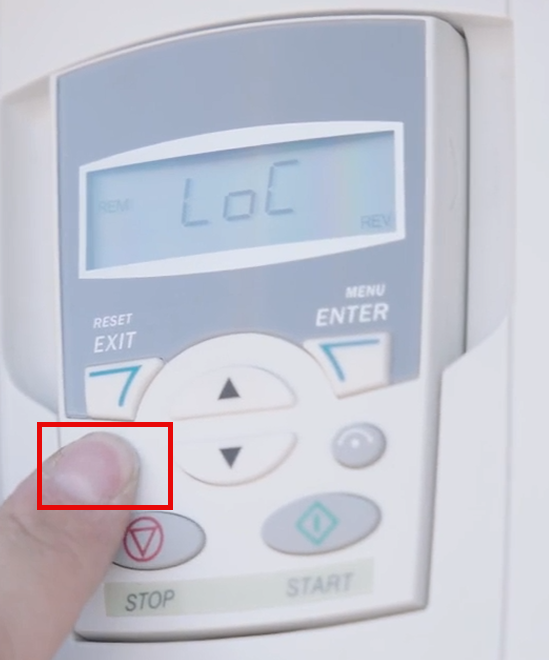
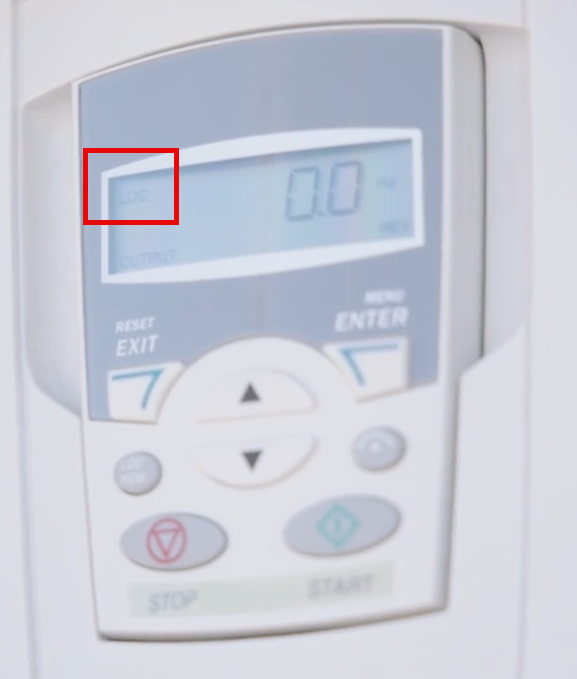
### LoC = Local - Sets the VFD to be controlled from the VFD Panel itself
#### **Note:** All adjustments and parameters must be made from the VFD itself. The HMI will still look like it's working, but the commands will not be received.
### REM = Remote -Sets the VFD to be controlled from the HMI in the container
#### **Note:** When attempting to control locally from the VFD itself while in REM, the error A5011 will show. This means you must either control from the HMI or change to LOC before making any changes or adjusting any parameters
---
### **Clearing a fault / Power cycling the VFD**
#### [**(Back to top)**](https://customers.gigaenergy.com/vfd-faults-0#table-of-contents)
### 1) Power Cycle the Fan Controller Breaker on the main switch gear cabinet by turning off the Fan Controller Breaker
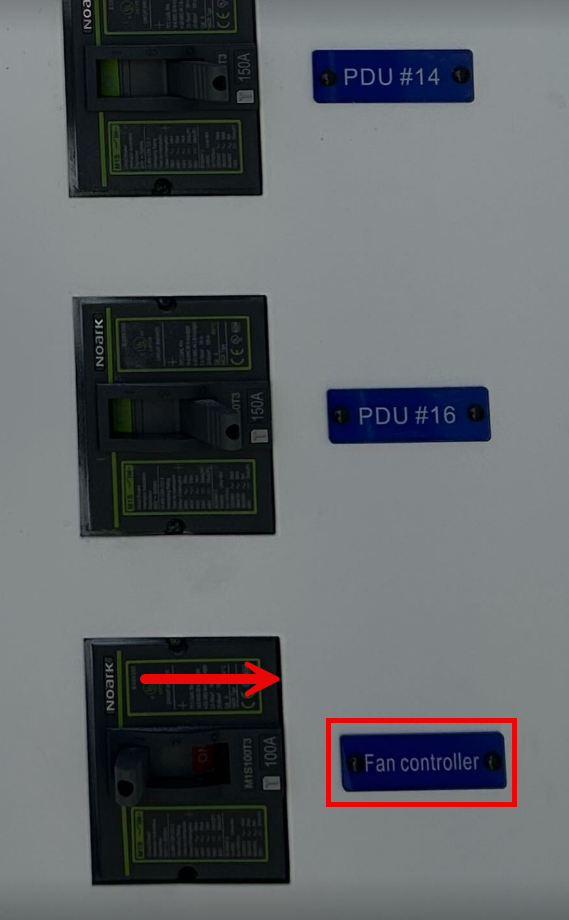
### 2) Leave the VFD off for 5 minutes
### The internal VFD fan will turn off and the VFD Controller screen will turn off
#### **NOTE:** The fault must be addressed/fixed before turning back on or the fault will cause the VFD to trip again
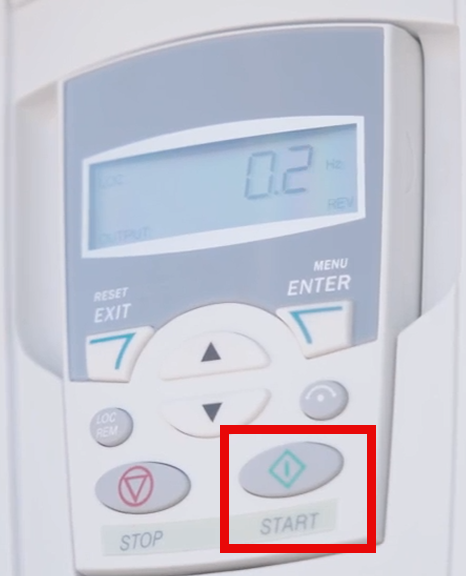
### 3) Turn on the Fan Controller Breaker. The fault will be cleared and the VFD can now be used.
### To start sending signal/power to the fans, push START from the VFD Panel
[**(Back to top)**](https://customers.gigaenergy.com/vfd-faults-0#table-of-contents)
---
#### If you have any questions, please text us at 832.280.1180 or if not urgent, you can submit a troubleshooting ticket to us**[HERE](https://www.gigaenergy.com/support).**
#### If you would like to setup a troubleshooting call, you can book a time on OUR **[CALENDAR](https://calendar.app.google/1yDoLeUTk2XwWFxh7)**calendar to speak with one of our technicians.
- [Pre-Delivery](https://customers.gigaenergy.com/pre-delivery?hsLang=en)
- [Setup/Install - Air Cooled Container](https://customers.gigaenergy.com/setup-install-air-cooled-container?hsLang=en)
- [Exhaust Fans and Filters](https://customers.gigaenergy.com/exhaust-fans-and-filters?hsLang=en)
- [PDUs](https://customers.gigaenergy.com/pdus?hsLang=en)
- [VFD](https://customers.gigaenergy.com/vfd?hsLang=en)
- [PLC and HMI](https://customers.gigaenergy.com/plc-and-hmi?hsLang=en)
[](http://gigaenergy.com)
[mailto:email@email.com](mailto:email@email.com)
Copyright © 2025, Giga Energy